android app
LIFT
A nutrition and training tracker that works offline and keeps your data on your phone. No accounts, no ads, no analytics, no subscription. Free and open source.
Pre-release. It works, but it's early — expect rough edges, and back up nothing you can't afford to lose yet.
What it does
Your numbers, in one place
Opens on today: calories and macros against your goal, what you've eaten, and what you trained. Below that, a week of stats — days logged, average calories, workouts, total volume — and charts showing how it's all trending.
Days you didn't log show as gaps rather than zeros, and the weekly average divides by days you actually tracked. Missing a day shouldn't look like eating less.
Steps, tracked automatically
Today's steps against a daily goal (10,000 to start, change it whenever you want), read straight from Health Connect. Nothing is written back, and the step count itself is never stored by the app — just read live each time you open the dashboard.
This one's native-only: browsers have no way to read Health Connect or HealthKit, so the web version only offers manual entry. If automatic step tracking matters to you, the app is where to get it.
The same calculator that's on this site
Mifflin-St Jeor, five activity levels, lose/maintain/gain, and selectable protein and fat targets — identical to the web calculator, so both give you the same answer. Save the result and everything else tracks against it.
Food logging that isn't tedious
- Scan a barcode and the nutrition comes straight off the packet
- Search by name against Open Food Facts
- One tap to re-log anything you've eaten before
- Grouped by meal, with calories per meal
- Manual entry for anything the database doesn't have
- Scroll back through previous days
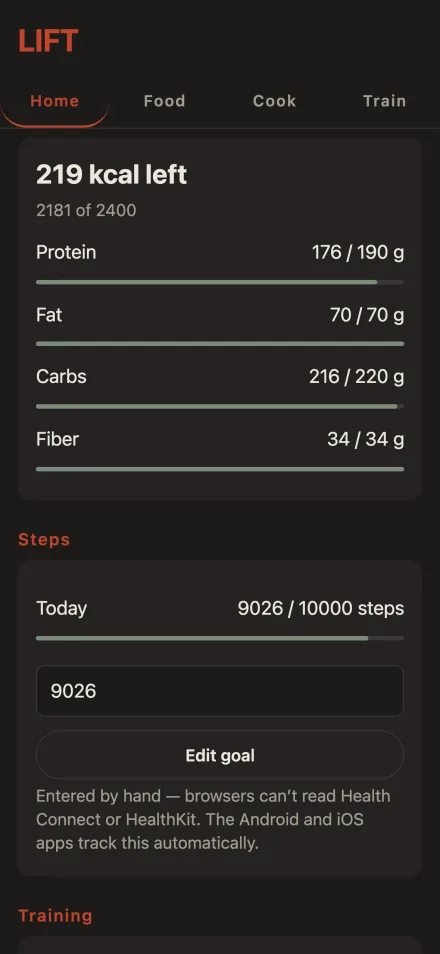
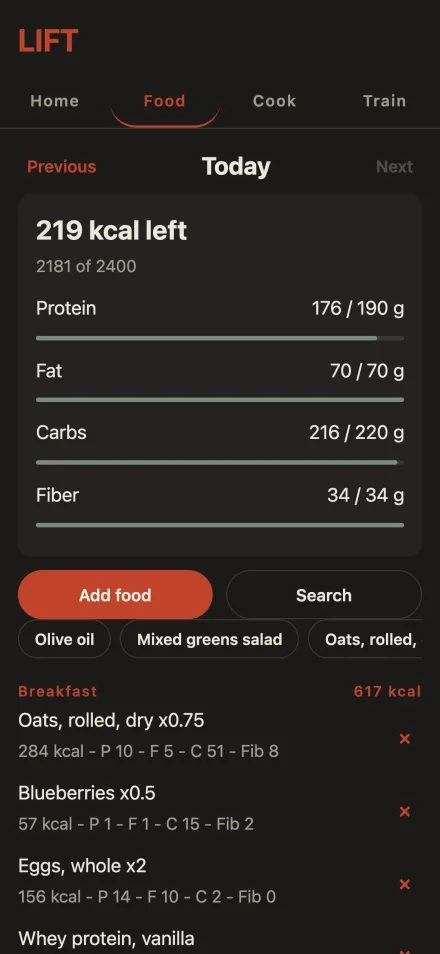
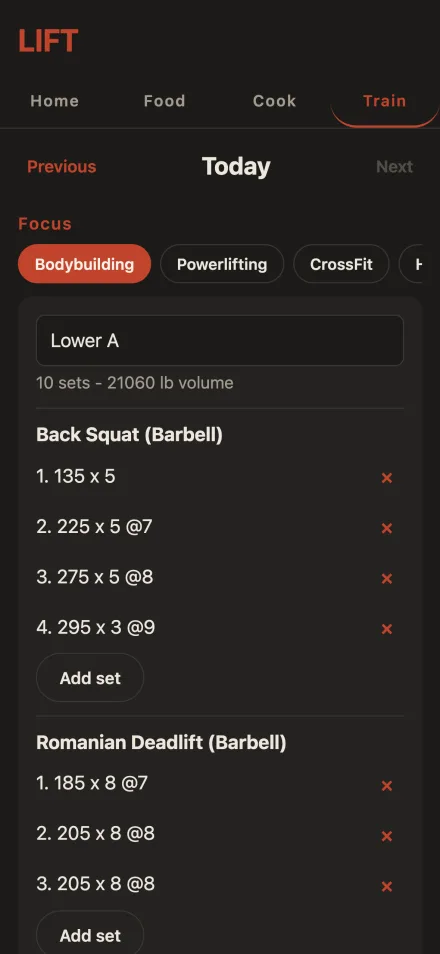
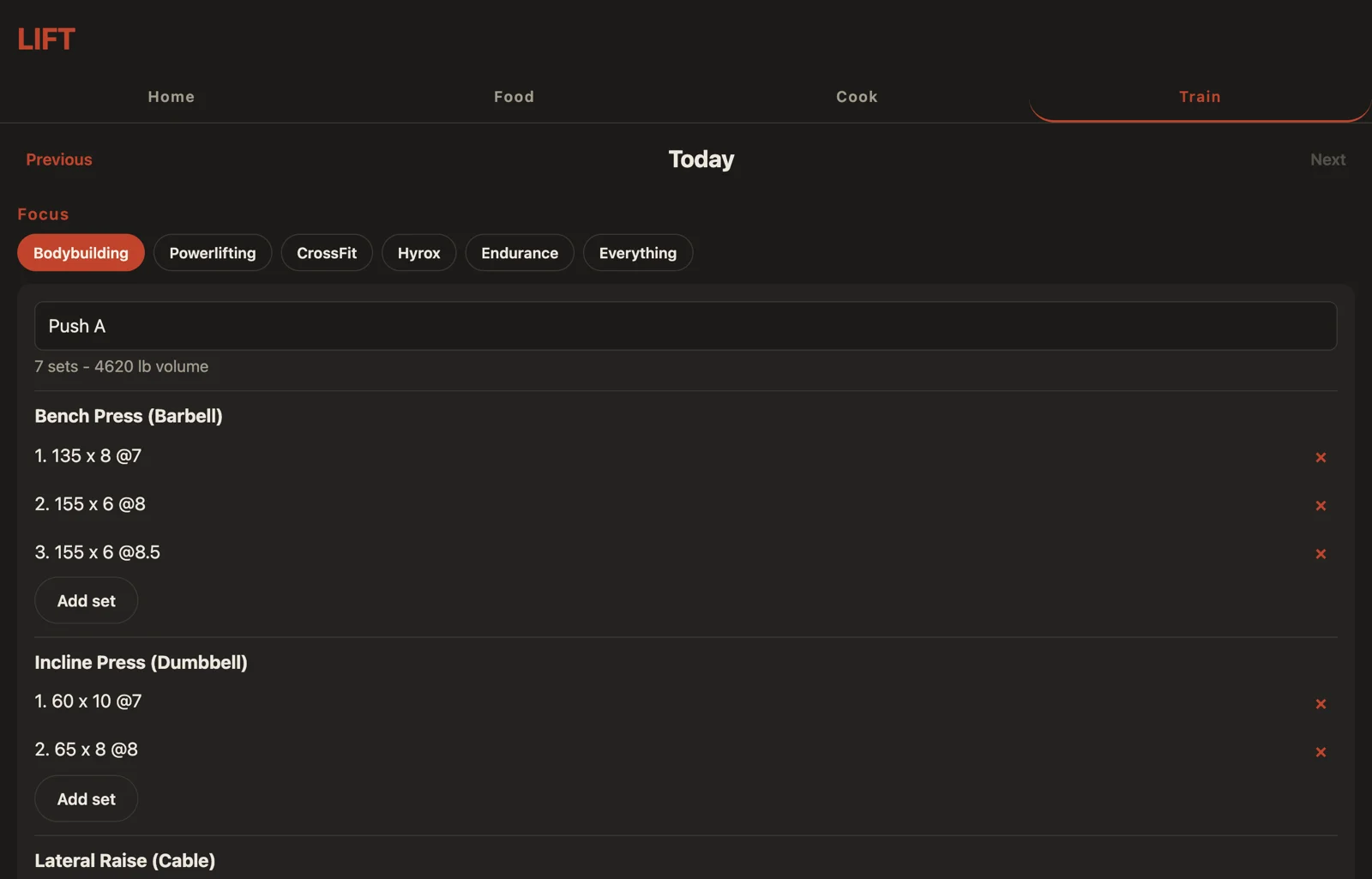
Those three are a phone. The browser version is the same app on a laptop — one column still, just a wider one, so a whole session fits without scrolling:
Training that adapts to how you train
Every set can record weight, reps, RPE, time, and distance. Pick a focus — bodybuilding, powerlifting, CrossFit, Hyrox, endurance or everything — and you only see the fields that matter to you. All three versions offer the same six. Switching focus never loses anything: every set keeps every field it was given, the app just stops asking.
The focus also decides which numbers you're shown. A bodybuilding session is summarised by volume; a powerlifting one by its top set; Hyrox and endurance by distance and time. A new set starts at 10 reps under bodybuilding and 5 under powerlifting. In the browser and the Android app the exercise progression chart follows the focus too, plotting volume, estimated 1RM or distance to match — the iPhone app has no progression chart yet, so there's nothing there for it to change.
- Equipment tracked separately, so cable and machine pulldowns keep separate histories
- Shows what you lifted last time, right under the exercise
- New sets prefill from your last one
- Save any workout as a routine and start it again next week
- Per-exercise progression charts with estimated 1RM
Your data is yours
Everything you log stays on your device. There's no account to create, nothing syncs to a server, and there is no analytics or advertising code in the app at all.
Nothing leaves your device unless you do something that sends it: a food search sends that search term or barcode to Open Food Facts, importing a recipe from a link fetches the page you pasted, Send to Coach puts your log in an email you send yourself, and a backup file goes wherever you save it. There is no LIFT server for any of it to reach. The privacy policy covers each of these, platform by platform.
Get it
Not on Google Play or F-Droid yet. For now you can install it directly:
Android will warn you about installing from an unknown developer — that's expected for any app not distributed through a store. You'll need to allow installation from whichever app you download it with.
Open source
The full source is public under the AGPL-3.0 licence. Anyone can read it, build it, or check that the privacy claims above are true.
COOK
Recipes, a meal plan, and a shopping list that builds itself from the week you planned — then logs each meal in one tap when you cook it. It arrived in version 1.2 and it's in the 1.3 download above — the newest and least-tested part of the app. Tell me what breaks.
On iPhone
Use the web version. Open it in Safari, add it to your home screen, and it works offline like any other app.
That isn't a stopgap — it's where the beta is. Getting it in front of real people through the browser means fixes reach you the moment I push them, with no store review sitting between us. If you want to try LIFT and tell me what's wrong with it, that's the one to use.
There's a native iOS build too — the same tracker, the same calculator, the same COOK tab, reading steps from HealthKit instead of Health Connect. It's being built up alongside the beta rather than shipped from it. Once the app is solid, that's when it goes to Apple and Google. Not before, and no date on it.
Two things genuinely differ there, and both are in the food log. It has no barcode scanner. And its food search is the USDA library bundled inside the app rather than a lookup against Open Food Facts — so it finds fewer packaged products by brand, but it works on a plane, and it means the iOS app makes no network requests at all. Not fewer than the Android app. None.
The web version can't read HealthKit, so steps are manual there. Everything else is the same log.
On a watch
There are two watch apps — one for Wear OS, one for Apple Watch. Both do the same narrow job: log food on the watch itself, with no phone anywhere near it, and hand the log back to LIFT afterwards.
The food library is bundled inside the app — the same 7,793 USDA records the web version searches — so a watch that has never been paired to anything still has something to log from. Search it, set an amount, pick a meal. The watch keeps what you log: the most recent 200 entries, however old they are.
Getting it off the watch is the blunt part. The watch draws your log as a QR code — several of them, one after another, if you've logged a lot — and you scan them with Scan from watch in the web version. The camera reads the screen and that's the entire transfer; nothing is uploaded. Afterwards you clear the log on the watch yourself, behind a confirmation. The watch has no way of knowing whether a scan actually worked, and a clear that happened automatically would throw the log away every time one didn't.
On Wear OS that QR code is the only way off, deliberately. The Wearable Data Layer — the normal way a Wear watch talks to its phone — needs Google Play Services on both ends, and LIFT for Android carries none. Rather than add it, the watch app does without a phone entirely: it asks for no internet permission at all, so it could not send your log anywhere even if something in it wanted to. You search by voice or the watch keyboard, whichever your watch offers, and set the amount on the rotating bezel or crown in grams or ounces.
The Apple Watch app has been around longer and does more, because watchOS lets it: sets logged during a workout with a rest timer, and runs and hikes recorded with GPS and written to Apple Health. It also syncs to LIFT on a paired iPhone — the native iOS build, not the web version — but it installs and runs on its own, and the QR export is what a watch with no phone behind it uses.
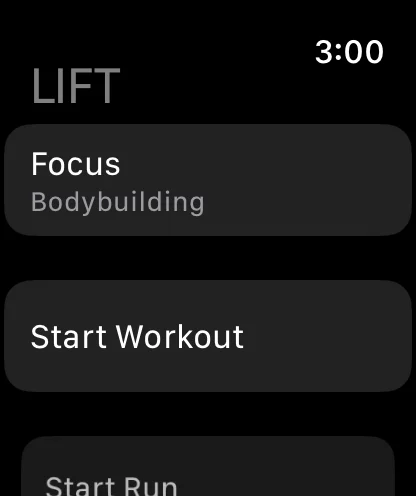
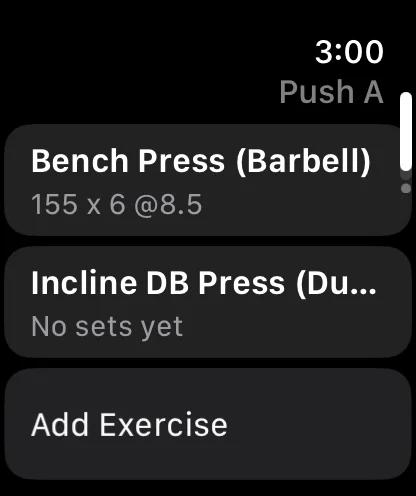

The Apple Watch app: the main screen, a set going in mid-workout, and the log drawn as a QR code for the web version to read. That third one is the whole transfer — point a phone at the watch.
The Wear OS app you can now have: it is downloadable here as of today. Installing it is genuinely awkward, though — Wear OS has exactly one route onto a watch, the Play Store, and LIFT isn’t there yet — so it is a sideload over adb: a computer on the same Wi-Fi network, and about five minutes with a command line.
The Apple Watch build has no equivalent route at all. It has never been near App Store review, and it is signed with a free Apple account, which means it installs on my own phone and nowhere else. Same position as the native iOS build above: written, running on real hardware, not shipped. No date on it.
The two of them, side by side. They do the same core job and diverge after that.
| On the watch | Apple Watch | Wear OS |
|---|---|---|
| Install it today | No | By sideload |
| Log food with no phone | ✓ | ✓ |
| Food library on the watch | ✓ | ✓ |
| Keeps the most recent 200 entries | ✓ | ✓ |
| Getting the log off | QR, or iPhone sync | QR only |
| Sets during a workout | ✓ | — |
| Rest timer | ✓ | — |
| Runs and hikes on GPS | ✓ | — |
| Writes to Apple Health | ✓ | — |
Every dash in the Wear OS column is the same decision: that app logs food and exports it, and asks for nothing to do it — no internet permission, no Play Services, no pairing. The Apple Watch app has been going longer and watchOS hands it more to work with.
The three LIFTs, side by side
The table above is the watches. This one is LIFT itself: the three places you can run it, and what each one can actually do. It's the same log and the same calculator in all three — what differs is what the platform lets the app read, and what you're allowed to install.
| Running LIFT | In a browser | Android app | iPhone app |
|---|---|---|---|
| Install it today | Yes | Yes | No |
| Daily steps | typed by hand | Health Connect | Apple Health |
| Runs and hikes on GPS | — | ✓ | ✓ |
| Scan a barcode | — | ✓ | — |
| Food search | Open Food Facts | Open Food Facts | bundled, offline |
| COOK tab | ✓ | ✓ | ✓ |
| Send a log to a coach | ✓ | ✓ | ✓ |
| Import a coach's plan | ✓ | ✓ | — |
| Read a watch's QR code | ✓ | — | — |
The iPhone "no" is the same one on the Coach page: the app is built, it runs, and it's signed with a free Apple account, which means nothing but my own phone will install it. It has never been to App Store review and there's no date on it. The browser is the iPhone answer today, and it's what everyone in the beta is using.
The plan row is new. As of LIFT 1.3 an Android phone opens a coach’s plan link in the app — it shows you what’s in the plan and writes nothing until you accept. The iPhone app has no way to receive a link at all, so an iPhone uses the browser. The COOK page goes through it properly.
Two of those rows are worth spelling out. A barcode in the browser is a number you type into the search box, not something the camera reads — the camera there is for scanning a watch, not a packet. And the iPhone app scans nothing because it has nothing to scan against: its food search is a database shipped inside the app, so unlike the other two it never touches the network. COOK's ingredient lookup in the browser is offline as well; it's the Food tab's search that goes out to Open Food Facts.
Coming
Two things that aren’t there yet, and what each one actually means. The exercise library was a third until LIFT 1.5; Android searches the same 873 exercises the browser and the iPhone app do now.
- Editing a logged entry without deleting it and putting it back in. No version does this today — browser, Android or iPhone — and the usual reason to want it is a serving count that went in wrong
- Routines in the browser. The Android and iPhone apps both save a workout as a routine and start a session from one. The browser version doesn’t, and never has — it can receive a routine a coach sends, but there’s no way to write your own. This page said otherwise for longer than it should have
Ready-made splits — push/pull/legs, upper/lower, full body — came off this list on 14 September, on Android and iPhone. They were waiting on the library, and for a real reason: a split is a list of exercise names, and names that don’t match the ones the app searches generate history that lines up with nothing. Both apps read the same file the library comes from, so the names agree by construction.
The browser doesn’t have them, because it has nowhere to put them yet — that’s the routines row above, and the splits follow it rather than the other way round.