beta test
Join The Test
LIFT is early, and it's built better with real people actually using it — not just me. Install it, use it the way you'd normally track food and training, and tell me what breaks, what's confusing, or what you wish it did. That feedback goes straight into what gets built next.
Nothing's on the App Store or Play Store yet, and that's on purpose for now — the beta is running through the browser so fixes reach you the same day instead of waiting on a store review. The versions below are what people are actually testing. The native apps go to Apple and Google once the thing is solid. No account, no password, nothing to download from anywhere sketchy.
On iPhone or iPad
This only works in Safari — if you normally use Chrome, open Safari instead just for this one step.
- Open Safari and go to dugcanlift.com/lift
- Tap the Share button — the square with an arrow pointing up, at the bottom of the screen (top of the screen on iPad)
- Scroll down the list that pops up and tap Add to Home Screen
- Tap Add in the top right corner
A LIFT icon now shows up on your home screen. Tap it like any other app from now on.
On Android — quick test
The fastest way to try it out, no download and nothing to allow. This is a lighter version — manual entry only, no automatic step tracking.
- Open Chrome and go to dugcanlift.com/lift
- Tap the ⋮ menu (three dots stacked vertically) in the top right
- Tap Install app (some phones say Add to Home screen instead)
- Tap Install to confirm
LIFT now shows up with your other apps. Tap it like any other app from now on.
On Android — full app
If you want the real thing — automatic step tracking, barcode scanning, everything — install the actual app instead of the web version. Takes a couple extra taps the first time, worth it if you're testing seriously.
- On your phone, go to dugcanlift.com/lift/install and tap Download LIFT for Android. Chrome asks whether you really want a file it can’t vet — tap Download anyway
- Open the downloaded file. Android will warn you it's outside the Play Store — tap Settings in that warning, then turn on Allow from this source (wording varies slightly by phone), then go back and open the file again
- Tap Install
- Tap Open once it's done
That "unknown source" warning is just Android being cautious about anything outside the Play Store — normal for pre-release testing, and only needs approving once.
The download comes straight from the latest LIFT release on GitHub, which also lists what changed and a SHA-256 checksum for the file.
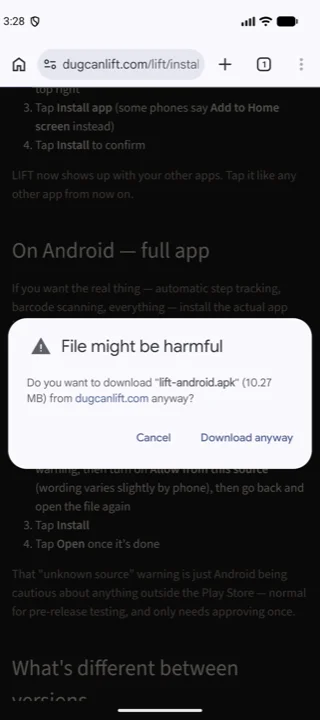
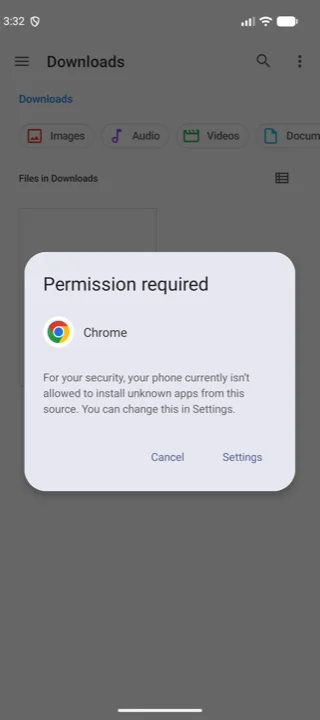
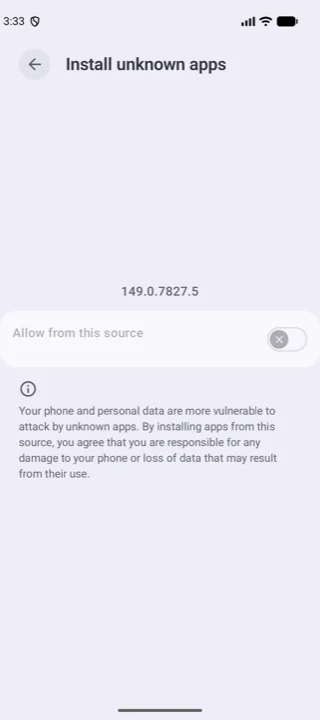
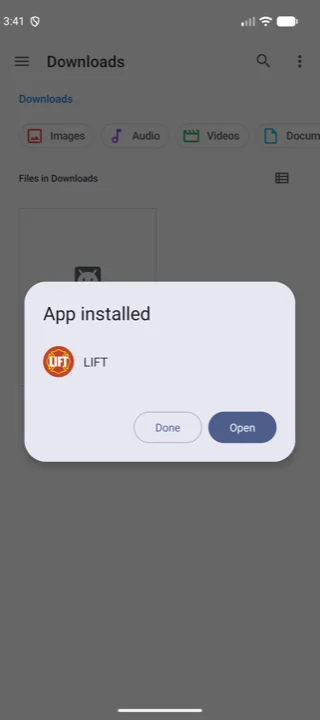
The four screens you’ll actually see, in order. All four want a tap; only the middle two are a permission, and you grant that once.
What you get
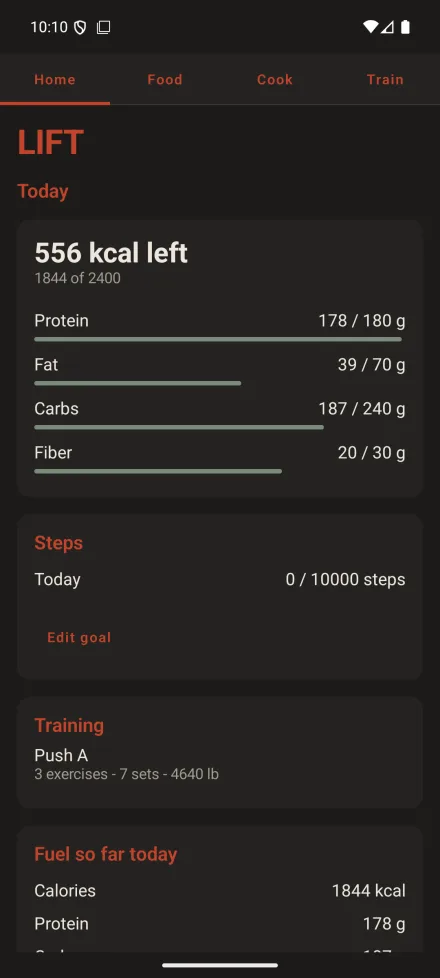
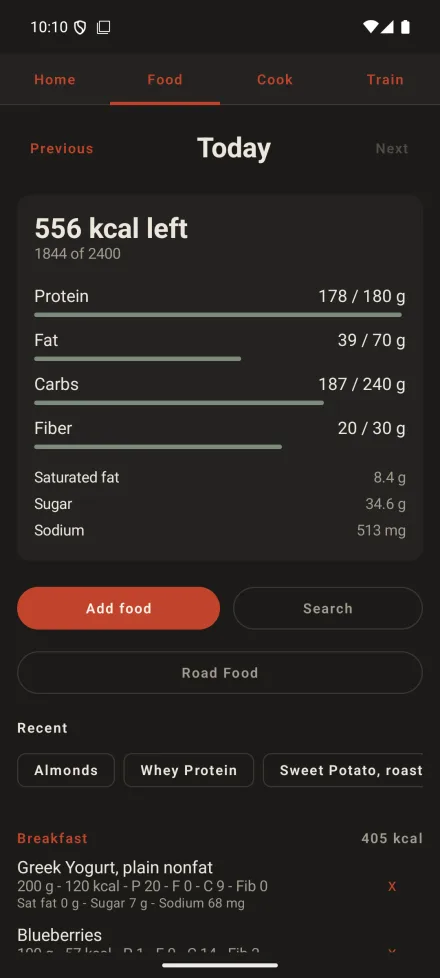
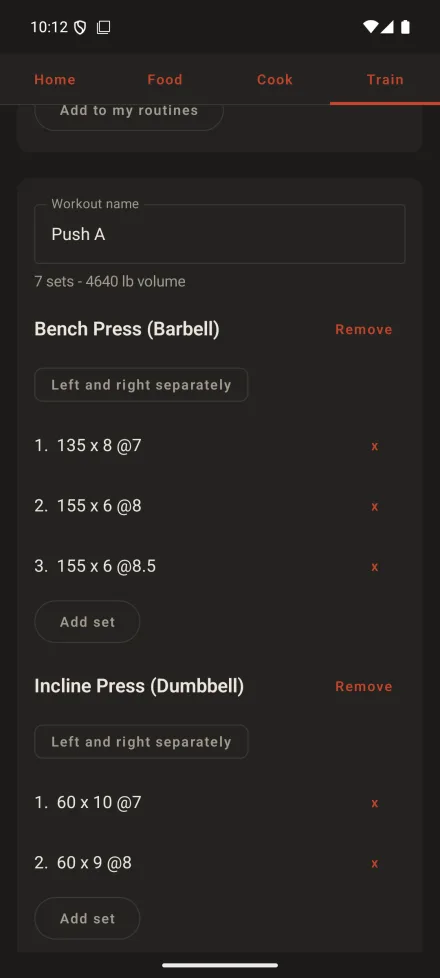
The app once it’s in: your day against your goal, the food log grouped by meal, and a session being logged set by set. LIFT 1.16, on a phone.
On a Wear OS watch
There’s a watch app too — a food log that runs on the watch itself, with no phone anywhere near it. It installs by sideload rather than by tapping a link, because Wear OS has no route onto a watch except the Play Store and LIFT isn’t there yet. You’ll need a computer and about five minutes: the steps are here.
What's different between versions
The web app and the full Android app share the same training tracker — focus modes, equipment tracking, routines, progression charts, all of it. The gap is just two things the web app can't reach on its own: your phone's camera and its step counter.
| Feature | Web app (iPhone & Android) | Full app (Android) |
|---|---|---|
| Macro & calorie calculator | ✓ | ✓ |
| Food search & logging | ✓ | ✓ |
| Barcode lookup (type the number) | ✓ | ✓ |
| Barcode scanning (camera) | — | ✓ |
| Automatic step tracking | — | ✓ |
| Full training tracker | ✓ | ✓ |
| Works offline | ✓ | ✓ |
| Data stays on your device | ✓ | ✓ |
Already have LIFT on Android? If you're on 1.1 or anything since, this one installs straight over the top — same signing key, so nothing to uninstall and your log stays where it is.
Only a build older than 1.1 has to go first, because the key changed at 1.1 and Android won't replace an app signed by a different one. That does delete the log, and those builds predate the backup button, so there's no way to save it first. I'm sorry — that one is on me.
Either way, worth doing now: on the home screen, under Your data, tap Save a backup file.
Back your log up
Worth doing on day one, not the day you need it. LIFT keeps everything on your own device and there is no account to log back into, so a cleared browser, a reinstall or a lost phone takes the lot with it.
On the home screen, under Your data, tap Save a backup file. That file is the whole log — food, training, weight, steps and your goal. Keep it wherever you keep things you would miss.
To put it back, or to move to a new phone, tap Restore from a backup file and pick it. Restoring only ever adds what is missing, so an old file can't wipe out training you have logged since — and because it carries your id with it, a coach sees the same person afterwards rather than a stranger appearing in their roster.
Why isn't this in the App Store?
It's early and I'd rather get it in front of real testers now than wait months on a store review process. Installing it this way is the same app, just skipping the store — your data stays on your device either way, and there's nothing to buy or sign up for.
Make your voice heard
This is the whole point of testing early — your feedback actually shapes what gets built next. Something confusing, broken, missing, or just annoying? I want to hear about it, even the small stuff.
Report a bug or request a feature
That form writes the email for you and sends nothing itself — you read it before it goes. Or mail dugcanlift@gmail.com directly, or send a DM on Instagram and tell me what happened.