part of lift and coach
COOK
Recipes go in. A meal plan and a shopping list come out. Cook it, and it logs itself with the macros already attached — because it knew the recipe before you ate it.
You can use it right now. COOK is live in the web version of LIFT and in Coach — that's where the beta is, so that's where it landed first. It shipped in the Android app as well — the build on the install page is LIFT 1.4.1. It's written in the iPhone app too, but that one still isn't something you can install.
The gap it fills
LIFT tells you what you ate. Coach shows your trainer what you ate. Neither one helps with the part that actually decides your week, which is standing in a kitchen on Sunday wondering what you're making.
COOK is that part. It isn't a separate app — it's a tab inside LIFT, and a page inside Coach. Same tool, two ends of the same relationship.
For you, in LIFT
Recipes you only type once
Write it down the way you'd say it — 2 tbsp olive oil, 400 g chicken thigh, 2 cloves garlic. COOK reads the quantity and the unit off the front and keeps the line you actually typed, so you can always check what it understood. Anything it can't parse stays on the list word for word rather than quietly disappearing.
Enter it once. It's there next week, and the week after.
A week you can actually shop for
Put recipes on days. The shopping list builds itself from whatever you planned, adding up across every meal — and scaling properly, so planning two servings of a four-serving chilli buys half the ingredients, not all of them.
Things that can't be added together aren't. Two cloves of garlic and thirty grams of garlic stay as two separate amounts on one line, because pretending otherwise would send you to the shop with the wrong number.
Logging that's already done
When you cook a planned meal, one tap logs it — name, macros, the right meal slot, the right day. No searching, no re-typing, no guessing at portions you already decided on days ago.
Same three screens in all three LIFTs, and they agree on every number. What differs is whether you can install it today, and whether a plan a coach sends can get in.
| Using COOK in LIFT | In a browser | Android app | iPhone app |
|---|---|---|---|
| Install it today | Yes | Yes | No |
| Write and keep recipes | ✓ | ✓ | ✓ |
| Reads quantities off the line | ✓ | ✓ | ✓ |
| Build a week of meals | ✓ | ✓ | ✓ |
| Shopping list, scaled to servings | ✓ | ✓ | ✓ |
| One tap to log a cooked meal | ✓ | ✓ | ✓ |
| Open a coach’s plan link | tap it | tap it | — |
All of that is in LIFT 1.4.1, the Android build on the install page. The last row is new there: tap a plan link on an Android phone and it opens in the app instead of the browser, with a preview you accept or decline before anything is written. The iPhone column is the native LIFT for iPhone — built, running, signed with a free Apple account, and not something anyone can install, so an iPhone uses the browser column for all of this.
For your trainer, in Coach
The same tool, pointed the other way. A coach builds the week for a client — recipes, days, servings — and sends it over. It lands in their app as a plan they can shop from and cook from, not a PDF they'll open once and never find again.
It travels the way a log already does: inside the link, after the #, the part browsers never send to a server. Nothing is uploaded going out and nothing is uploaded coming back. The plan is small enough to survive being an email because it doesn't carry the recipes — it points at them.
And because LIFT stamps what it logs, the loop closes on its own: a coach can see which of the meals they planned actually got cooked. Not "did you hit your protein." Did you make the thing.
Both halves work today between the web versions, and into the Android app as of LIFT 1.3. Android registers the plan link as a verified App Link — the phone checks this site for a file naming the app’s signing key, and only then will it hand the link over — so tapping one opens LIFT rather than a browser tab, shows you what’s in the plan, and writes nothing until you accept. The iPhone app can’t do this yet: it would need a universal link, this site serves no Apple site-association file, and the free signing the app is built with couldn’t register one if it did. There’s no share-sheet or paste route behind it as a fallback, so an iPhone opens a plan link in the browser version, which handles it fine.
Two of the three Coaches have COOK in them. The Android Coach has none of it — not a stub, nothing — and there's no date on that.
| Using COOK in Coach | In a browser | Android app | iPhone app |
|---|---|---|---|
| Install it today | Yes | Yes | No |
| Write and keep recipes | ✓ | ✓ | ✓ |
| Reads quantities off the line | ✓ | ✓ | ✓ |
| Build a client’s week | ✓ | ✓ | ✓ |
| Shopping list, scaled to servings | ✓ | ✓ | ✓ |
| Send the week as a link | ✓ | ✓ | ✓ |
That column was a row of dashes until Coach 1.1. The Android build now has COOK too — write recipes, build a client’s week from them, read the shopping list it produces, and send the week as a link their LIFT opens. All three versions of Coach do the same job now.
The Android Coach isn't destructive about what it can't show: restore a backup written by one of the others and it keeps the recipes and meals in it untouched, so saving a backup later hands them back whole. It just won't let you read or build them. The iPhone Coach has the lot and can't be installed, same as the iPhone LIFT above — in practice, coaching with COOK means the browser.
What it looks like
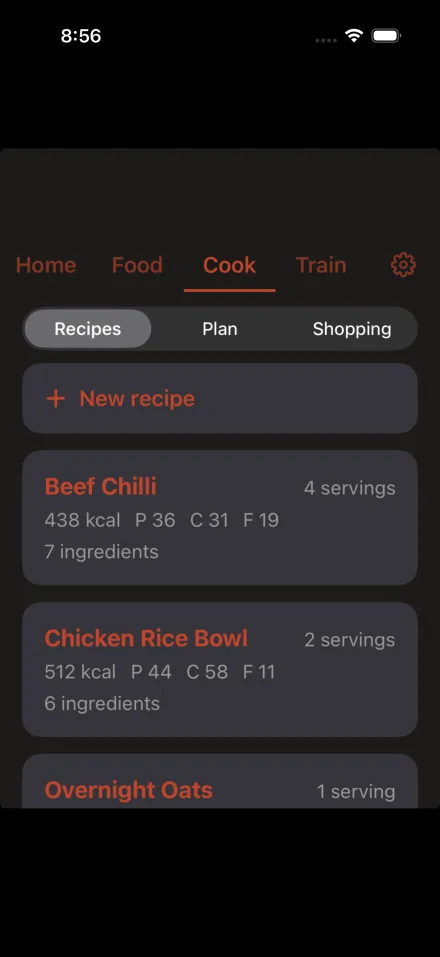
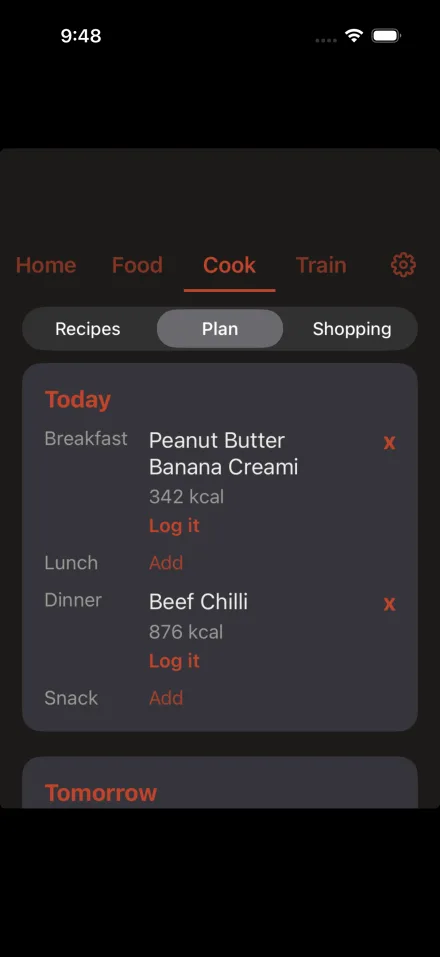
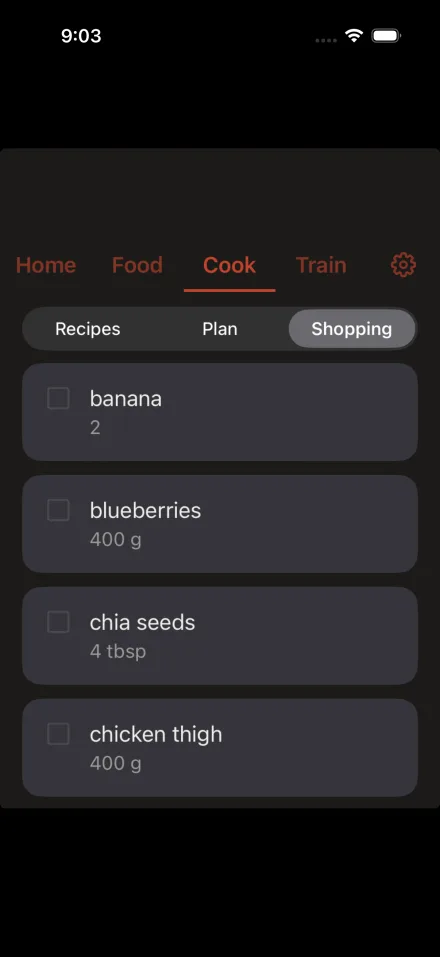
iPhone. Android and the web version are the same three screens, and they agree on every number — the same plan gives the same calories and the same shopping list on all four.
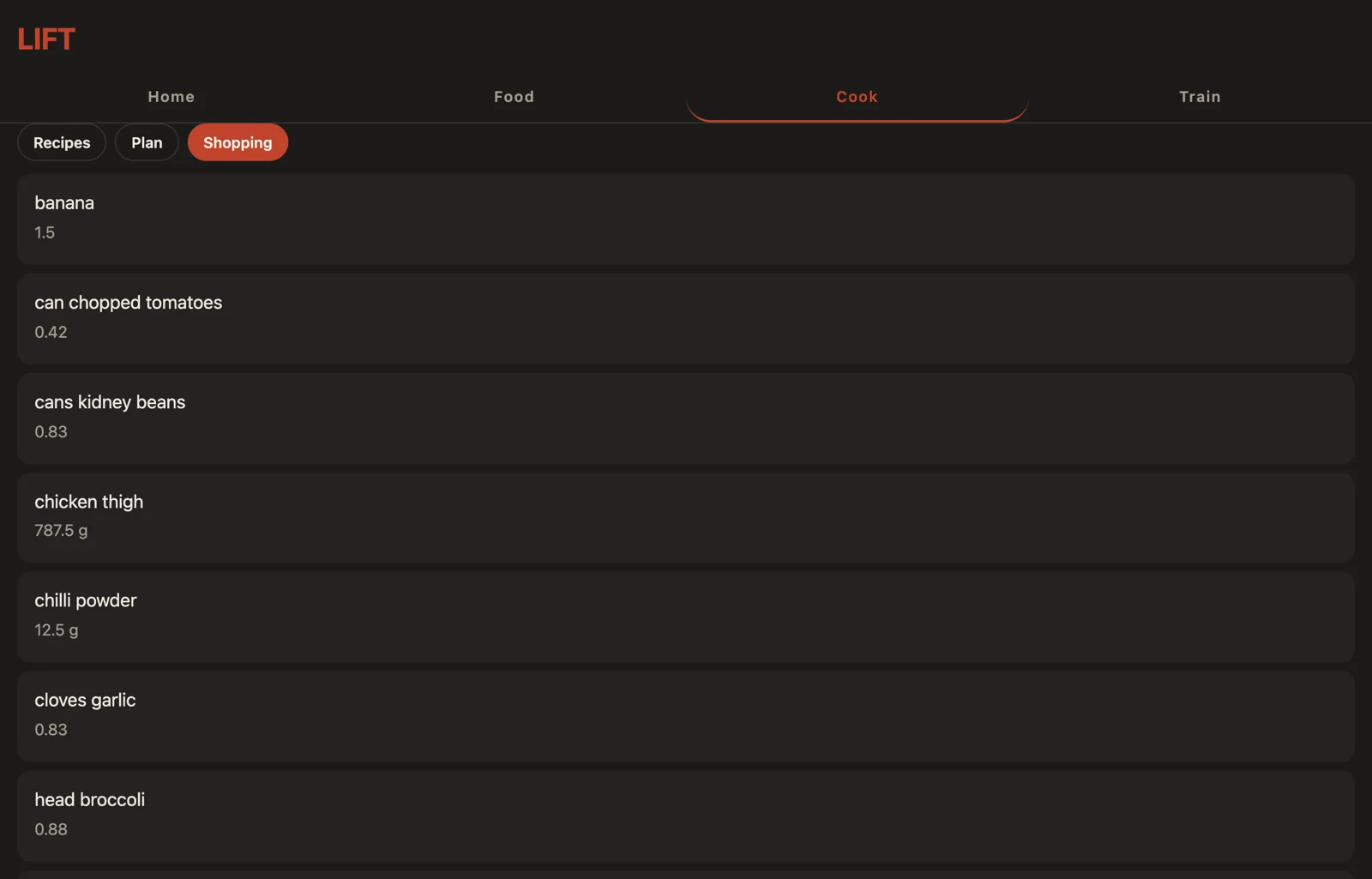
The same shopping list in a browser. The fractional amounts are the scaling doing its job — 787.5 g of chicken thigh because the week asks for three and a half servings of a four-serving recipe, not a round 900.
Try it
Nothing to install and no account to make.
- If you're the one eating — open LIFT, go to the Cook tab, and write a recipe you already make.
- If you coach — open Coach, go to Cook, write a few recipes, build someone a week, and send the link.
If something's wrong with it, that's exactly what I want to hear. It's early, and it's easier to change now than later.
Where recipes come from
Three places, and I want to be straight about all three.
- Ones you write. Type your own in. Your grandmother's thing that isn't on the internet and shouldn't be.
- Ones I write. The Creami cards and the rest of what I actually cook, as real recipes with real numbers instead of pictures I paste into DMs.
- Ones you already own. If you've got cookbooks as PDFs, getting them into your own kitchen app is a reasonable thing to want, and COOK will help you do it on your own machine. What it won't do is turn into a pipe for republishing other people's work.
Two things worth knowing up front
It won't rip recipes off Instagram for you. That would mean running a scraper against platforms whose terms say don't, on infrastructure someone has to pay for. That part stays personal.
Macros are sometimes estimates, and it says so. A recipe with no nutrition attached shows as unknown rather than quietly logging zero calories into your day. Zero is a lie that adds up.
Your data is yours
Nothing changes. Recipes, plans and shopping lists live on your device with everything else you log. No account, no server, no sync. COOK adds no network access to either app.
Open source
Same as the rest of it — AGPL-3.0, readable by anyone.