Each Side, and the Sets You Actually Wrote
“3 × 8” on a Bulgarian split squat has always been ambiguous. Three sets, or three each side? The coach knew; the plan never said. Today all six apps can say it — and while adding that, two older bugs turned up that were quietly rewriting what a coach had asked for.
Each side, and one side
A coach can now mark an exercise each side: every prescribed set is done on both. “3 × 8 each side” is still three rows in the plan and means six sets, three a leg.
A single set can also name a side. That is the part no coach could write before: an extra set on the left, a lighter right side coming back from something, one arm at a time on a lift that is usually two.
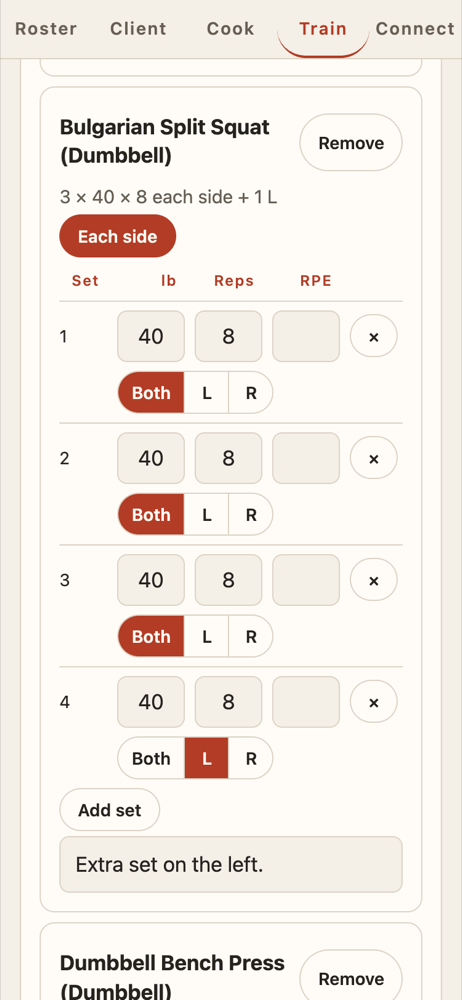
The controls only appear when they are wanted. A bench press editor looks exactly as it did; tick Each side, or tap Set a side on a single set, and the Both / L / R buttons arrive. Lifts whose names say what they are — single-arm, one-leg, split squat, lunge, pistol — start ticked, and whatever the coach chooses is remembered for next time.
What the lifter sees
In LIFT, a prescribed lift now carries a target per side. Logging starts on the side your coach asked for next, with their weight and reps already in the row, and the header counts each side against what was asked.
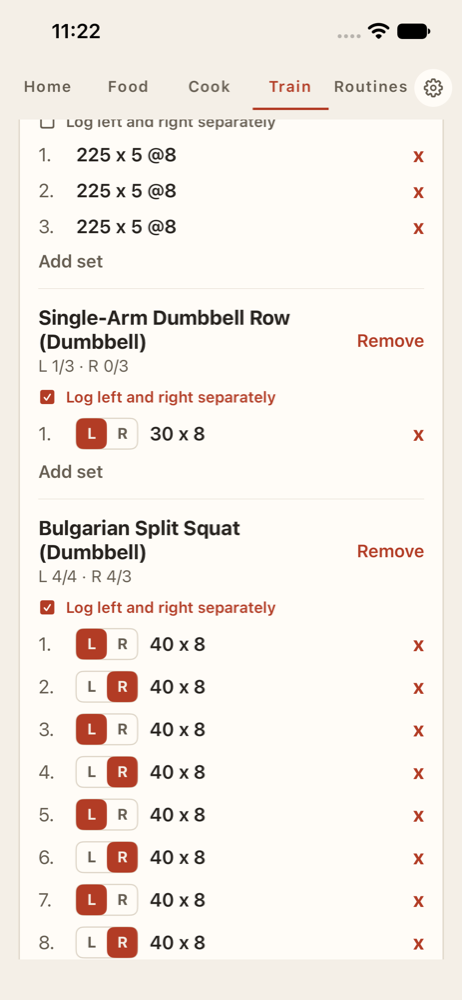
Nothing about the maths changed. Your progression chart, the gap between your sides and your volume all still read what you logged, not what was planned. And an older copy of LIFT reads a new plan perfectly well — it just shows the sets without the sides, which is the right way to not understand something.
Coach for Android can send a plan at last
Coach for Android could build a week and never send it: only meals had a Send. Now Train has a week you move through, you book each session onto the day you mean, and one button sends that week to your client.
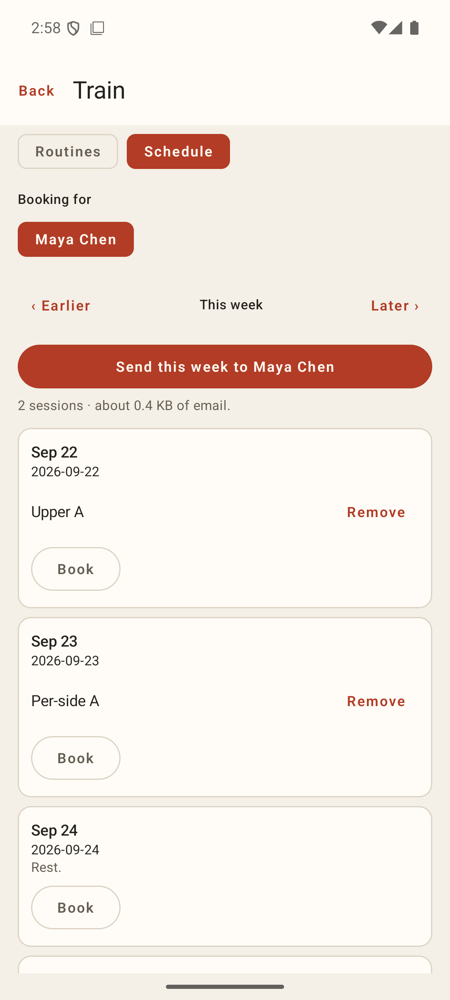
Booking used to put every session on today, because there was no day to pick. That is fixed by the same change.
Two bugs that rewrote a coach’s work
LIFT for Android kept only the most common set of a plan. A coach writing 60 × 8, 60 × 8, 70 × 6 sent a ramp; the phone showed three sets of 60. Worse, “five reps, you pick the weight” came out with a weight on it. Every set now arrives exactly as written, and blank stays blank.
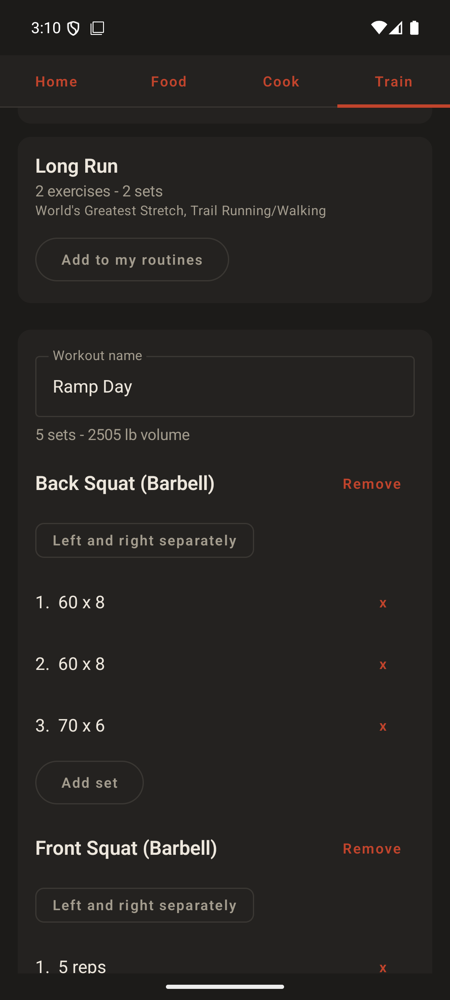
Coach for Android did the same thing on save. Editing a routine flattened its ramps and dropped the coaching notes. Also fixed.
Both were found by sending the same plan between apps and comparing what came out the other end — which is worth doing more often, and is now a test in each app.
A coach’s plan can reach LIFT on iPhone
The iPhone build had a gap nobody had walked into yet: plan links only worked through Apple’s website-linking system, which needs a paid developer account this project does not have. A plan link simply opened the website.
Now a plan reaches LIFT the same three ways it reaches Coach on iPhone: paste
it into Settings → Paste a Plan Link, tap a dugcanliftlift:// link, or
share the link to LIFT from Messages, Mail or Safari.
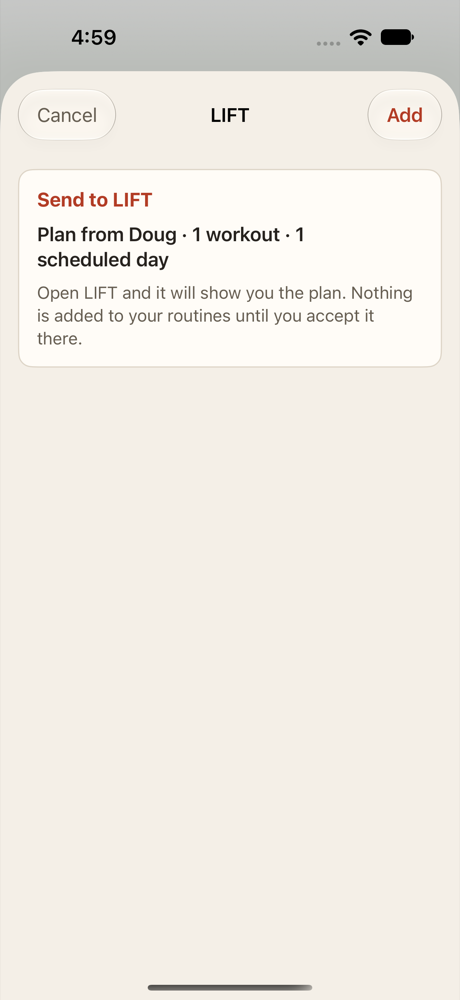
It refuses what it should: junk, another site’s link dressed up to look like one, and your own log link back to your coach, each with its own explanation.
Also today
“Cold Plunge” is not a one-sided lift. LIFT on iPhone matched parts of words when guessing which lifts are logged a limb at a time, and “lunge” lives inside “plunge”. It matches whole words now, like the other apps. A choice you made yourself was always kept, and still is.
Where to get it
- The browser versions are live now: LIFT and Coach.
- LIFT for Android 1.12 and Coach for Android 1.8 are on the install page.
- iPhone and iPad builds carry everything above; they are not on the App Store yet.